Contact Sheet, part 2: managing a photo site with one Go binary
In short: Contact Sheet is an open-source Hugo photo gallery. One Go binary, photo, manages it from a CLI or a local GUI: it makes the thumbnails, reads EXIF, sorts photos into albums and publishes with git. This post covers the gallery features, the tool, and how I rewrote it from Python to Go with an AI pair.
A Hugo Photo Gallery You Manage with One Binary
In the previous post I described the architecture of Contact Sheet, the open-source project behind malak.photo. It’s a static Hugo site on Amplify, with full-resolution originals in S3 behind CloudFront.
This post is about the other half: what the Hugo photo gallery does and the photo tool that drives it. The tool is a single Go binary with a CLI and a local GUI. Thanks to it, adding photos takes a drag and a click instead of an afternoon of editing files.
What the Hugo Photo Gallery Gives You
- Justified photo grids (rows of equal height, every photo in its own aspect ratio) and a PhotoSwipe lightbox with EXIF.
- Albums, and a photo can be in several of them. Tags, featured photos, and a virtual Unassigned album for photos you haven’t sorted yet.
- A configurable homepage and browsing by gear (both below).
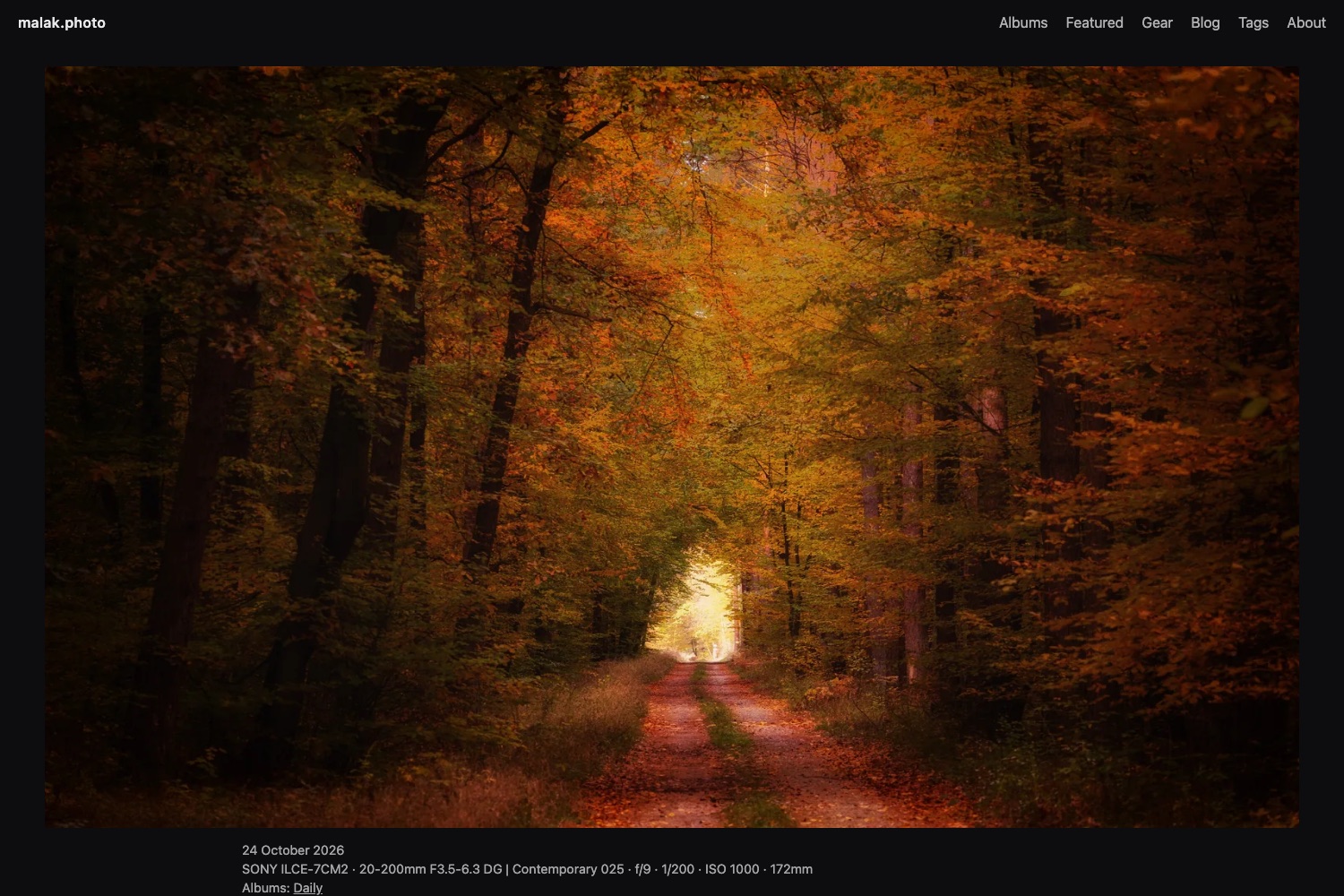
- A page per photo (
/p/<id>/) with Open Graph tags, so a shared link shows the photo in a preview. Each page also has a stable 1600px JPG link. - A blog, with shortcodes to embed a single photo or a whole album in a post.
The Homepage: Featured Photos or an Album
What the homepage shows is a setting in hugo.toml:
[params]
  homeMode  = "featured"   # or "album"
  homeAlbum = "daily"      # used when homeMode = "album"
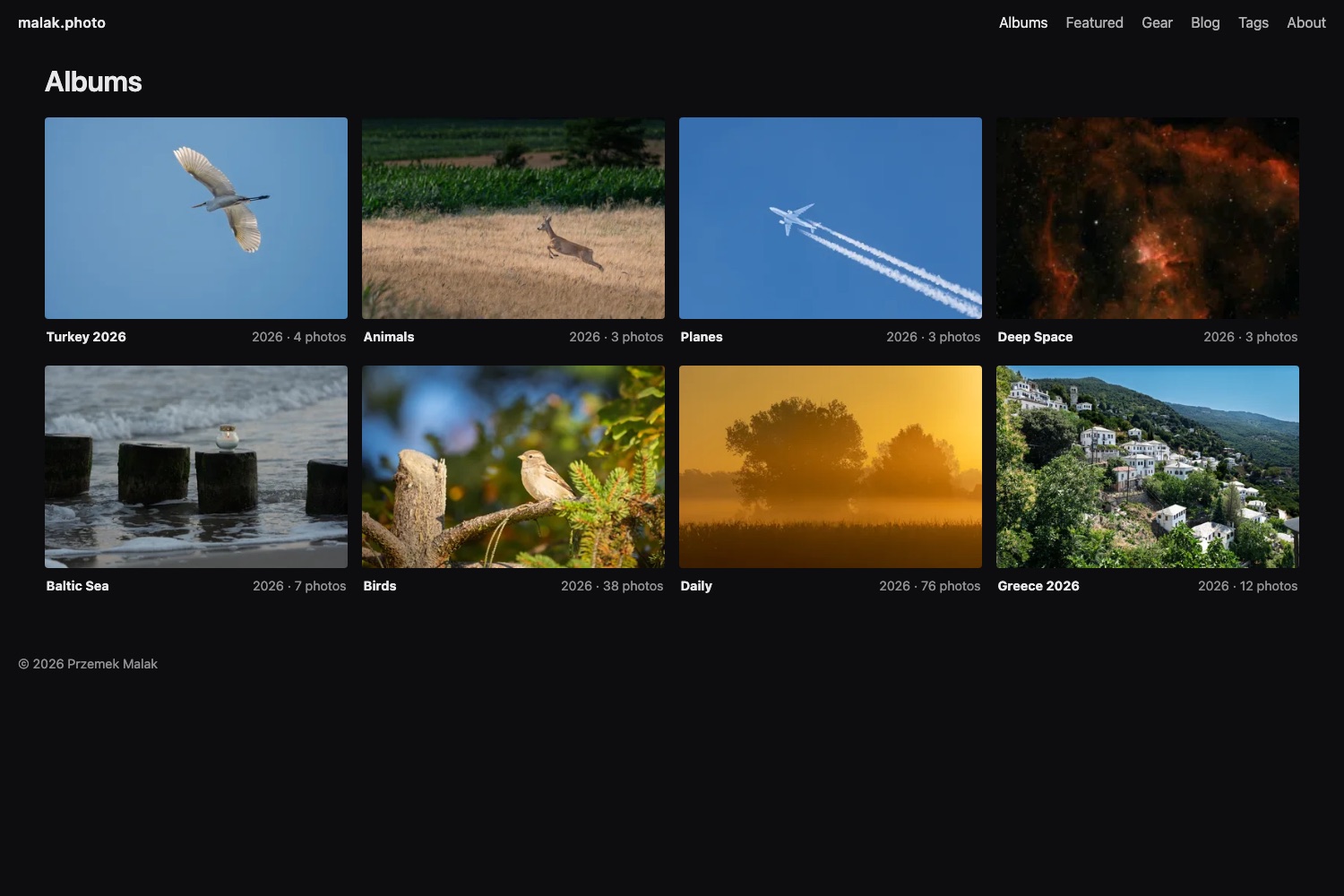
With featured, the homepage is a curated “best of”: every photo you marked as featured, from any album. You mark them with photo add --featured or with the “Featured on home page” switch in the GUI. With album, the homepage shows one album instead. That works well for a photo-a-day site or a current project. Switching between the two is a one-line change and a rebuild, with no content to move.
Browse the Hugo Photo Gallery by Gear
This feature costs nothing to maintain, because there’s no gear list to keep up to date by hand. Every time photo adds a photo, it reads the camera and the lens from EXIF. Then it makes sure there’s a page for each.
The gear index and gear pages
The site gets:
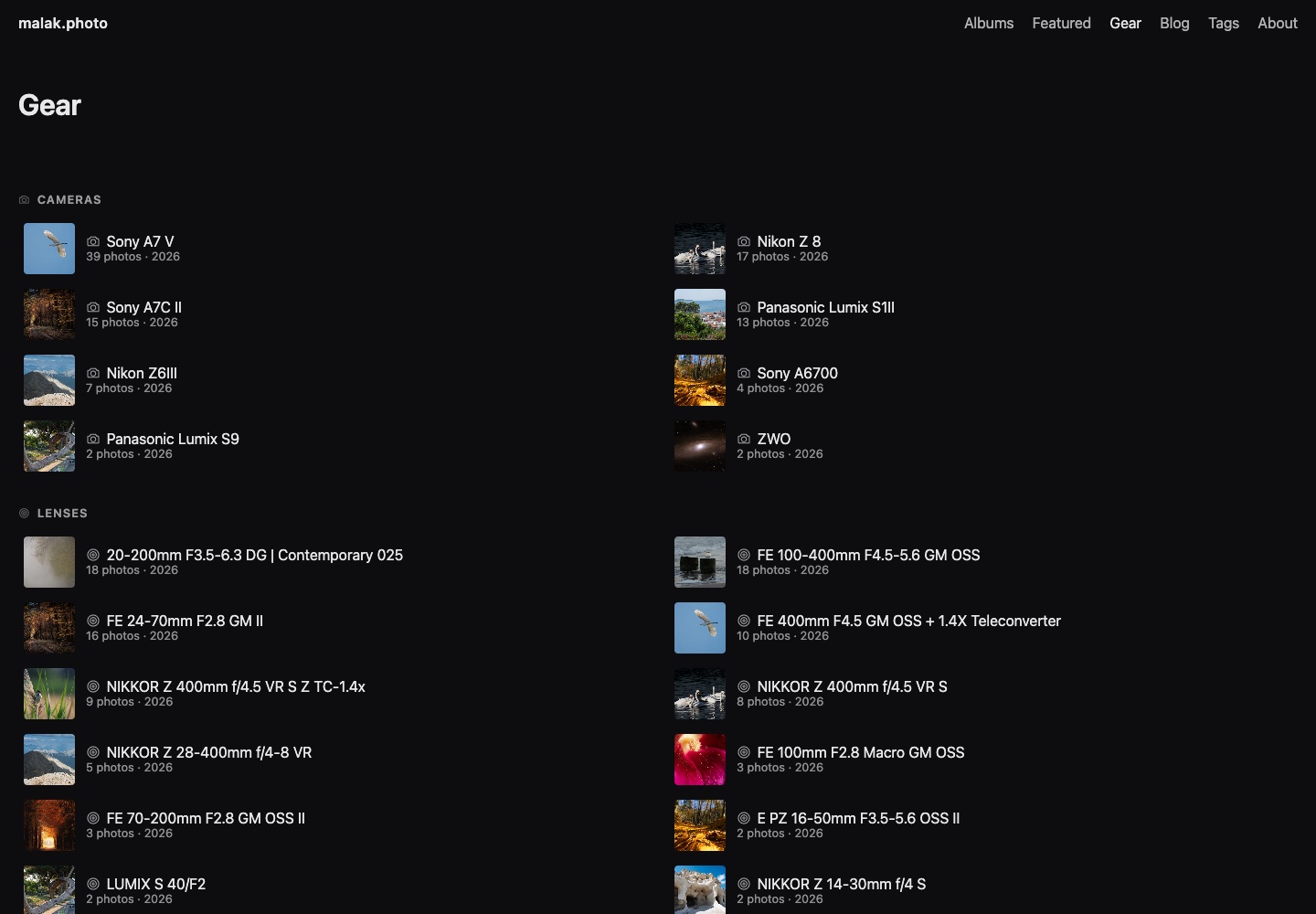
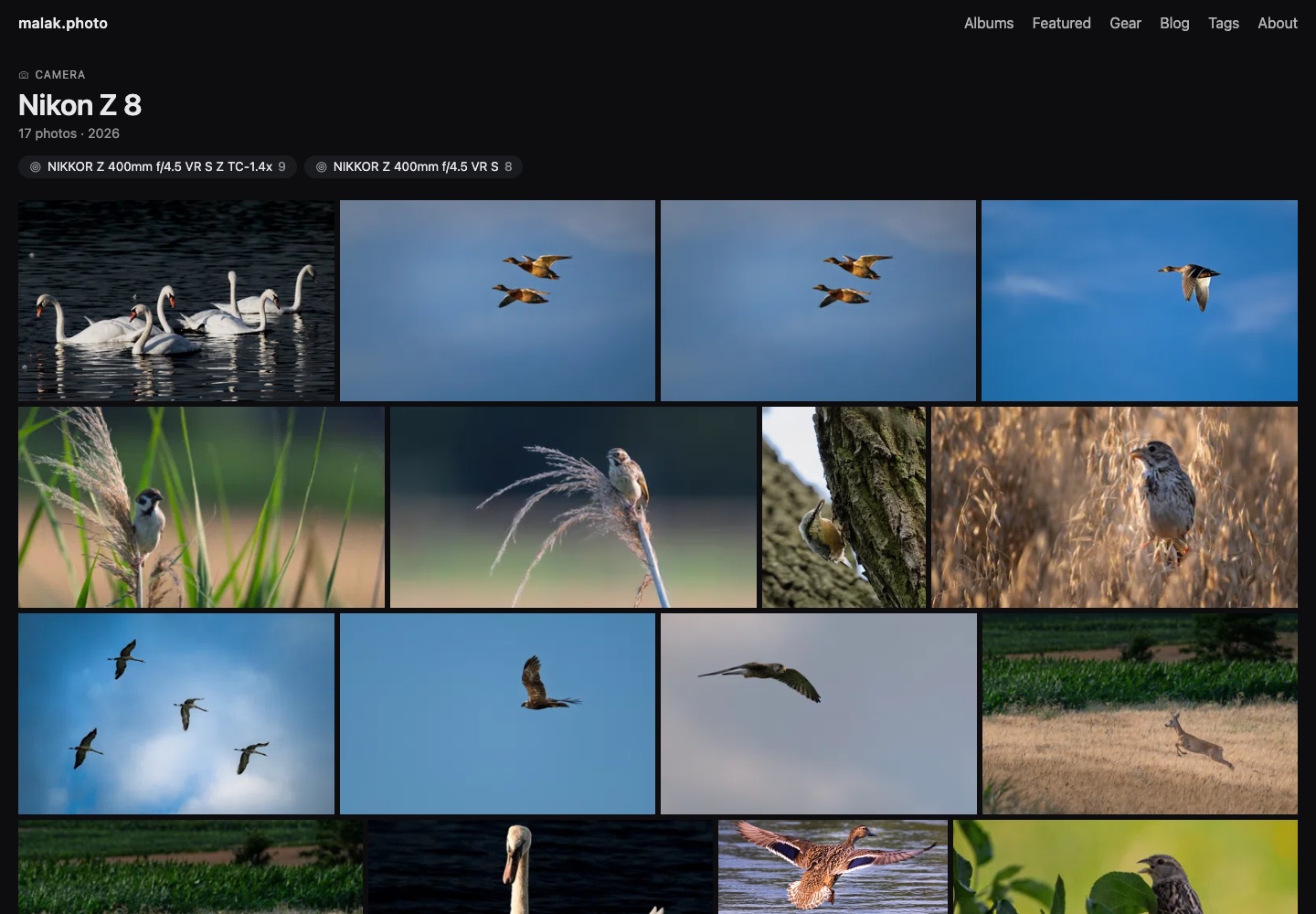
/gear/, an index with three lists: Cameras, Lenses and Setups (camera + lens combinations). Each entry has a thumbnail of the latest photo taken with it, the number of photos and the years. The lists are sorted from the most used.- A page per camera, per lens and per setup, e.g.
/gear/nikon-corporation-nikon-z-8/, with a justified grid of every photo taken with it. A camera page also links to the lenses used with it, each leading straight to the photos from that setup. A lens page does the same for cameras. - Links from the lightbox. The camera and lens shown next to a photo link to their gear pages. So you can go from one photo to everything shot with the same lens.
How Go and Hugo split the work
On every catalog change, photo writes a small stub page per camera, lens and setup into content/gear/. It also removes the ones no photo uses any more. The Hugo templates do the rest: the index counts and sorts in the template, and each gear page filters photos.json by the EXIF fields. Photos without EXIF are simply left out.
The one thing both sides must agree on is the URL. A camera called NIKON CORPORATION NIKON Z 8 has to become the same slug in Go, which creates the page, and in the Hugo template, which links to it from the lightbox. So there’s exactly one rule: lowercase, and replace every run of non-alphanumeric characters with a dash. It’s implemented once in Go and once as a Hugo replaceRE. An end-to-end test builds a site with Hugo and checks that the links it renders point to the pages Go created.
Readable Camera Names Without AI
EXIF names are not made for people. The camera make and model come out as NIKON CORPORATION NIKON Z 8 or SONY ILCE-7M5. Nothing in EXIF says that ILCE-7M5 is the Sony A7 V. The site is built by plain Hugo on Amplify, so whatever makes the names nicer has to be deterministic and live in the repository.
So there are two layers. When photo creates a gear page, it cleans the camera name once with a few fixed rules: drop corporate words like CORPORATION or CO., LTD., drop a make repeated in the model, and spell a known brand the usual way. NIKON CORPORATION NIKON Z 8 becomes Nikon Z 8. The result goes into the title of content/gear/<slug>/index.md.
That file is the second layer. To show Sony A7 V instead of Sony ILCE-7M5, I edit one line in it. The tool never overwrites a title I changed, and setup names are always built from the camera and lens titles. URLs stay the same, so no link breaks.
The photo Tool
My first version of the tool was a Python CLI. It worked, but every time I sat down to add photos I had to remember which virtualenv it lived in. So I rewrote it in Go as a single binary with no dependencies:
- WebP encoding uses libwebp compiled to WASM. There’s no
cwebpto install and no cgo to fight with when cross-compiling. - EXIF reading and S3 uploads (AWS SDK for Go v2) are built in.
- Release builds for macOS, Windows and Linux, on amd64 and arm64, come from one CI workflow.
The data model didn’t change in the rewrite. The Go tool reads and writes exactly the same photos.json, derivatives and S3 layout as the Python one did. As a result, switching was invisible to the site.
photo add ~/Pictures/iceland -a iceland --tags landscape --featured
photo link best-of-2026 iceland-042 iceland-051
photo rm iceland-013
photo backup ~/photo-backup     # copy every photo's original from the CDN
photo gui                       # local web panel at http://127.0.0.1:8765
photo cdk deploy PhotoSiteStack # deploy the AWS stacks (see the previous post)
photo <command> -h prints a command’s options. In the repo, docs/cli.md describes every command and every setting in contact-sheet.toml.
The Photo Manager
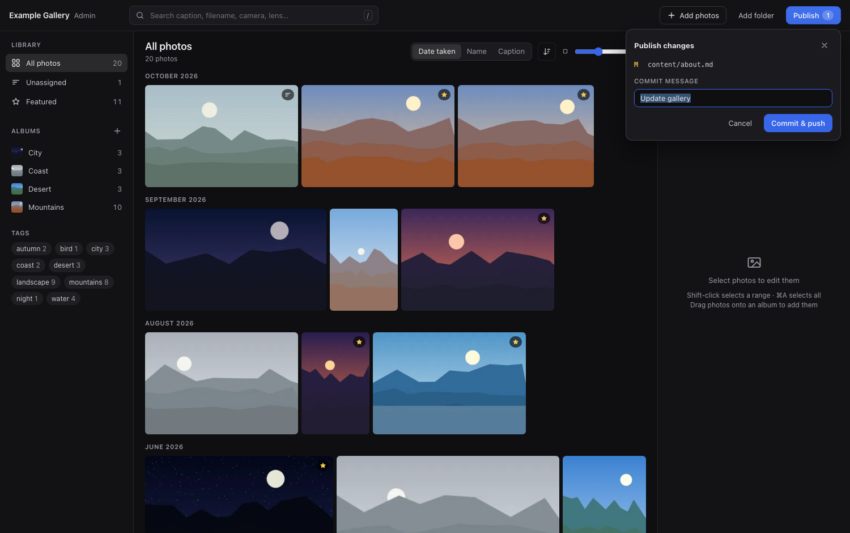
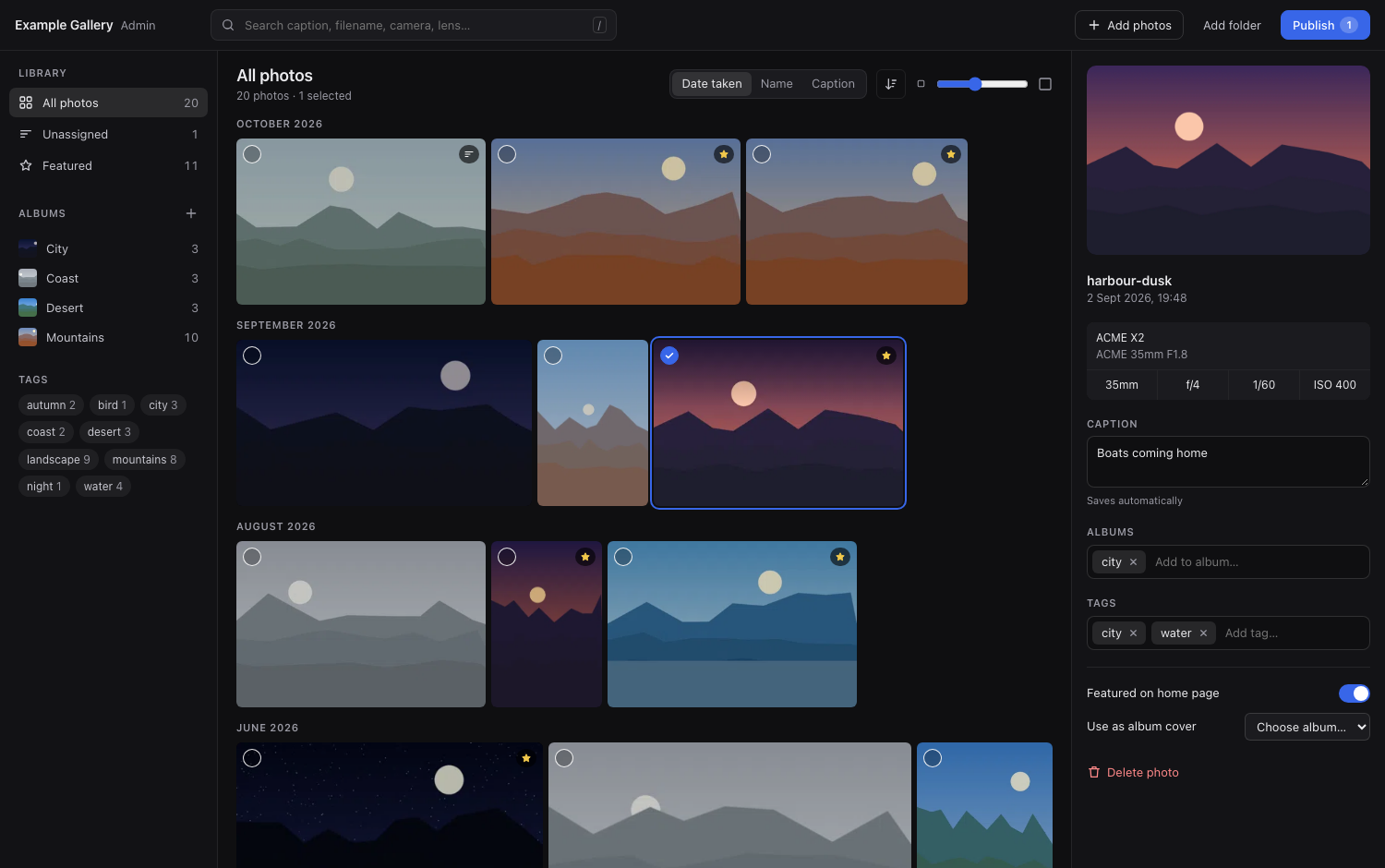
photo gui is what I actually use day to day. It’s a local web panel: plain HTML, CSS and JavaScript, embedded in the binary with go:embed, with no CDN and no build step. It listens on 127.0.0.1 only. I drag photos or whole folders in and drag them onto albums. I edit captions and tags, rename or delete albums, and press Publish, which commits and pushes.
Dropping a whole folder takes every JPEG in it and its subfolders, ten files per request, with progress shown as it goes. One detail came up while building it. A photo’s id comes from its file name, and cameras restart their numbering. So 2024/IMG_0001.JPG and 2025/IMG_0001.JPG would be the same photo. The import keeps the first one and names the files it skipped, instead of letting one silently replace the other.
There’s a guide to the photo manager in the repo.
Deleting Is Staged
The design decision I care about most is how deleting works. A photo lives in four places: the catalog, the WebP derivatives, the generated pages and the original in S3. The first three are files in your git working tree, so until you commit, any mistake can be undone with git. The S3 original is different: once it’s deleted, it’s gone.
So the GUI never deletes an original right away. First it does the reversible part: it updates the catalog, then removes the derivatives. Then it adds the original’s key to a small queue file, .photo-pending-deletes.json, which is gitignored. Publish commits and pushes. Only after both succeed does it mark the queued deletes as published.
Even then the originals stay for a week. The first version deleted them right after the push, and a review pointed out the gap. Until Amplify finishes the build, the live site still links to them, and so would an older deploy after a rollback. Now a later Publish, at least seven days on, deletes them. Before deleting anything, the tool also checks the catalog. If you restored a photo with git or added the same file again, its original is in use and stays. If a delete fails, it stays queued for the next try.
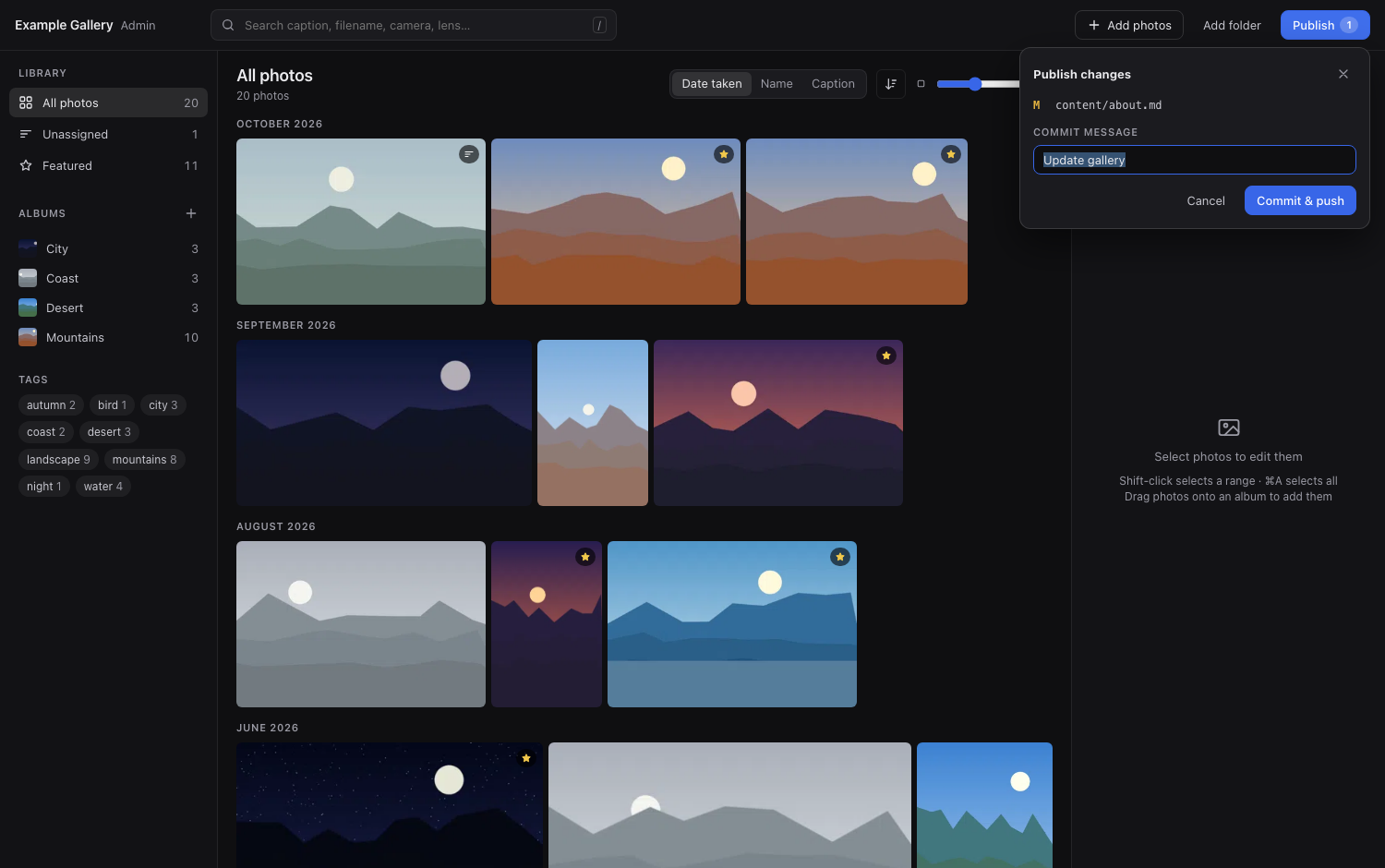
Deleting an album works the same way. The GUI asks whether to also delete the photos that are in no other album, and their originals wait for Publish too. The CLI commands photo rm and photo rm-album, on the other hand, delete immediately. In a script you’ve already decided.
Quick Start: Your Own Hugo Photo Gallery
You need two things: the photo binary and Hugo extended (0.166.0 or newer). That’s all: no Go, no Node, no AWS account. Originals in S3 are optional and covered in the previous post.
- Download the archive for your system from the latest release, unpack it and put
photoon yourPATH. The binaries aren’t signed, so macOS needsxattr -d com.apple.quarantine ./photoonce. The README covers Windows too. - Create a site and add photos:
photo init my-photos && cd my-photos
photo add ~/Pictures/iceland -a iceland --featured
hugo server        # http://localhost:1313
photo init creates the site and downloads the theme into themes/contact-sheet/. Your repository holds only your content: hugo.toml, contact-sheet.toml, content/, data/photos.json and assets/gallery/. Theme updates are one command: photo theme update. If you have Go, you can use the theme as a Hugo Module instead (photo init my-photos --module). That’s how malak.photo consumes it.
Rewriting Python in Go with an AI Pair
I built most of this project together with Claude Code. The Python-to-Go rewrite is the best example of how that went.
One rule: zero diff
Before any code, I wrote a short design spec with Claude. One requirement mattered more than the rest: the Go tool must produce byte-for-byte the same files as the Python one. The site was live and the catalog had over 80 photos in git. If running the new tool once rewrote photos.json, I’d get a giant meaningless diff. I’d never be sure whether something had actually changed.
The spec turned into a plan of twelve small tasks: config, catalog, EXIF, imaging, S3, pages, git, CLI, HTTP API, GUI, an end-to-end test, and finally retiring Python.
Then it went fast. According to the git log, on November 10, 2026, the spec and the plan were committed at 6:47 in the morning. The last feature task landed at 7:30, and the branch was merged before 10:00. Eleven tasks in 43 minutes is a coding agent working through a finished plan. It implemented each task with tests, and a review ran before the next one started. A fix from the final review of the whole branch landed at 8:30.
The bugs that unit tests don’t catch
What the reviews and the zero-diff rule found is the interesting part. None of these would fail a typical unit test. Instead, they’re differences between Python’s and Go’s standard libraries:
- Go escapes HTML in JSON by default.
encoding/jsonwrites&,<and>as\u0026,\u003cand\u003e. So a caption like “sunset & fog” would come out different from what Python wrote. The fix is anEncoderwithSetEscapeHTML(false). Non-ASCII letters were never a problem: the Python tool already wrote them as-is (ensure_ascii=False), like Go does. - Go sorts map keys, Python doesn’t. Python’s
json.dumpskeeps dict insertion order, so every photo’s EXIF block wascamera, lens, aperture, shutter, iso, focal. Go’s default marshaling sorts keys alphabetically. That would reorder the EXIF block of every single photo. The fix is a small customMarshalJSONthat writes Python’s order. The proof: runningphoto syncon the real catalog gives a byte-identical file. - Photo ids. The Python tool slugified file names (
DSC 0001.JPGbecamedsc-0001). My first Go version didn’t do it the same way. A final review of the whole branch caught it before a single new photo got a different kind of id. - Order of operations when deleting. A review of the delete code moved saving the catalog before removing any files. Now a crash halfway can’t leave the catalog pointing at photos that no longer exist.
- Local mode. The end-to-end test builds a real site with Hugo. It found that without S3 the tool recorded the path to the source file as the “original”, which Hugo can’t resolve. It now points at the local preview.
Retiring Python
I didn’t delete the Python tool on day one. Both lived side by side for nine days while I used the Go version for real work, including the GUI redesign and the gear pages. Then the Python tool went, along with its virtualenv.
My takeaway: the AI wrote the code quickly, but the speed wasn’t the valuable part. The spec with a hard, testable rule, and the reviews that checked against it, were. Without the zero-diff rule, the HTML escaping and the key order would have slipped through as “harmless” changes. I’d have found out from a confusing git diff weeks later.
Summary: a Hugo Photo Gallery That’s Easy to Run
The photo tool is what makes a static Hugo photo gallery practical to run. It’s one binary with no runtime to install. It has a GUI for everyday work, a CLI for scripts, and a GUI delete path that can’t lose an original by accident. Together with the AWS setup from the previous post, it’s my answer to “where do I put my photos?”.
- Source code (MIT): github.com/PrzemekMalak/contact-sheet
- Live example: malak.photo
If you try it, let me know. Issues and pull requests are welcome.