Contact Sheet, part 1: Photo Portfolio on AWS for $2 a Month: Hugo, S3 and CDK
In short: this is a self-hosted photo portfolio on AWS. A static Hugo site runs on Amplify, and full-size originals sit in a private S3 bucket behind CloudFront. Two CDK stacks set it all up. It costs about $1.80 a month. A CDN limited to North America and Europe and a cost alert guard against someone hammering the originals.
Why I Host My Own Photo Portfolio on AWS
I take a lot of photos, mostly nature: wildlife, birds and landscapes. For years they ended up in the usual places: a bit on Instagram, a bit on Flickr, most of them nowhere. What I wanted was simple: my own site, on my own domain, where photos look good, load fast, and stay mine. No feed algorithm, no compression I can’t control, no subscription.
So I built malak.photo, my photo portfolio on AWS. Then I pulled out everything that wasn’t specific to my site and published it as an open-source project: Contact Sheet.
This post is about the architecture and the AWS side: how the photos are stored, served and deployed, and why. The photo tool and the gallery itself get their own post.
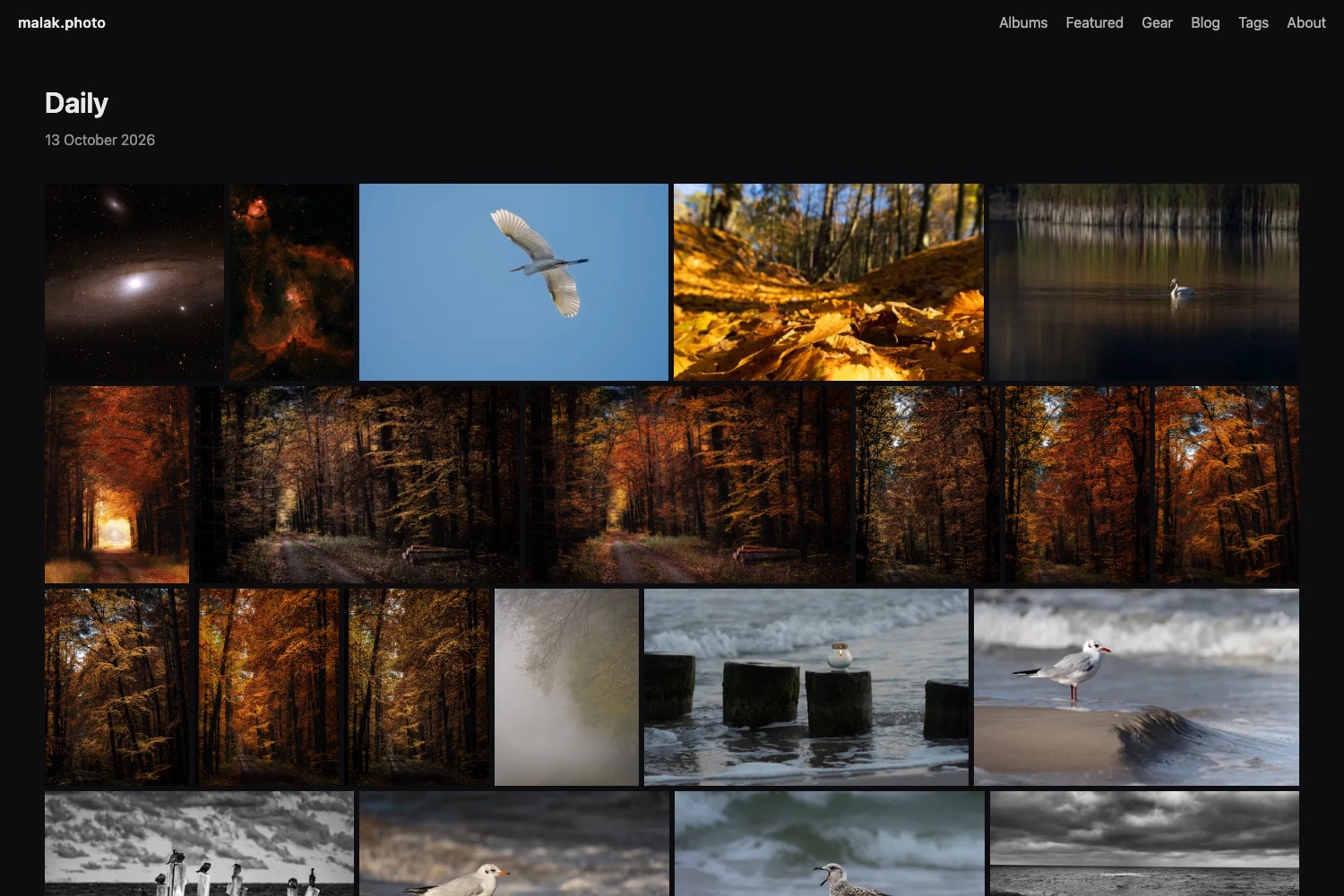
Contact Sheet: an Open-Source Hugo Photo Gallery
Contact Sheet is an open-source Hugo photo gallery, made of three things that work together:
- A Hugo theme for a photo portfolio and blog: justified grids, albums, tags, a lightbox with EXIF.
photo, a small Go program (CLI and a local GUI) that manages the photo catalog. The command reference and the photo manager guide are in the repo.- Optional AWS infrastructure (CDK): S3 + CloudFront for full-resolution originals and Amplify to build and host the site.
Everything is public: there are no private albums, accounts or comments, and no online editor. You manage photos on your own computer and publish with git.
The Problem It Solves
Static site generators are great for text. Photos are harder. You don’t want 25 MB RAW exports in git. You don’t want to resize images by hand. And you definitely don’t want to edit JSON to put a photo in an album. Contact Sheet splits the problem:
- Thumbnails and previews (WebP, ~400px and ~1600px) are small, so they live in the repository and are built into the site.
- Full-resolution originals go to a private S3 bucket and are served through CloudFront. They never touch git.
- The catalog (
data/photos.json) holds every photo with its albums, tags, caption and EXIF. Thephototool writes it, the theme reads it.
Architecture: a Photo Portfolio on AWS with Hugo and a CDN for Originals
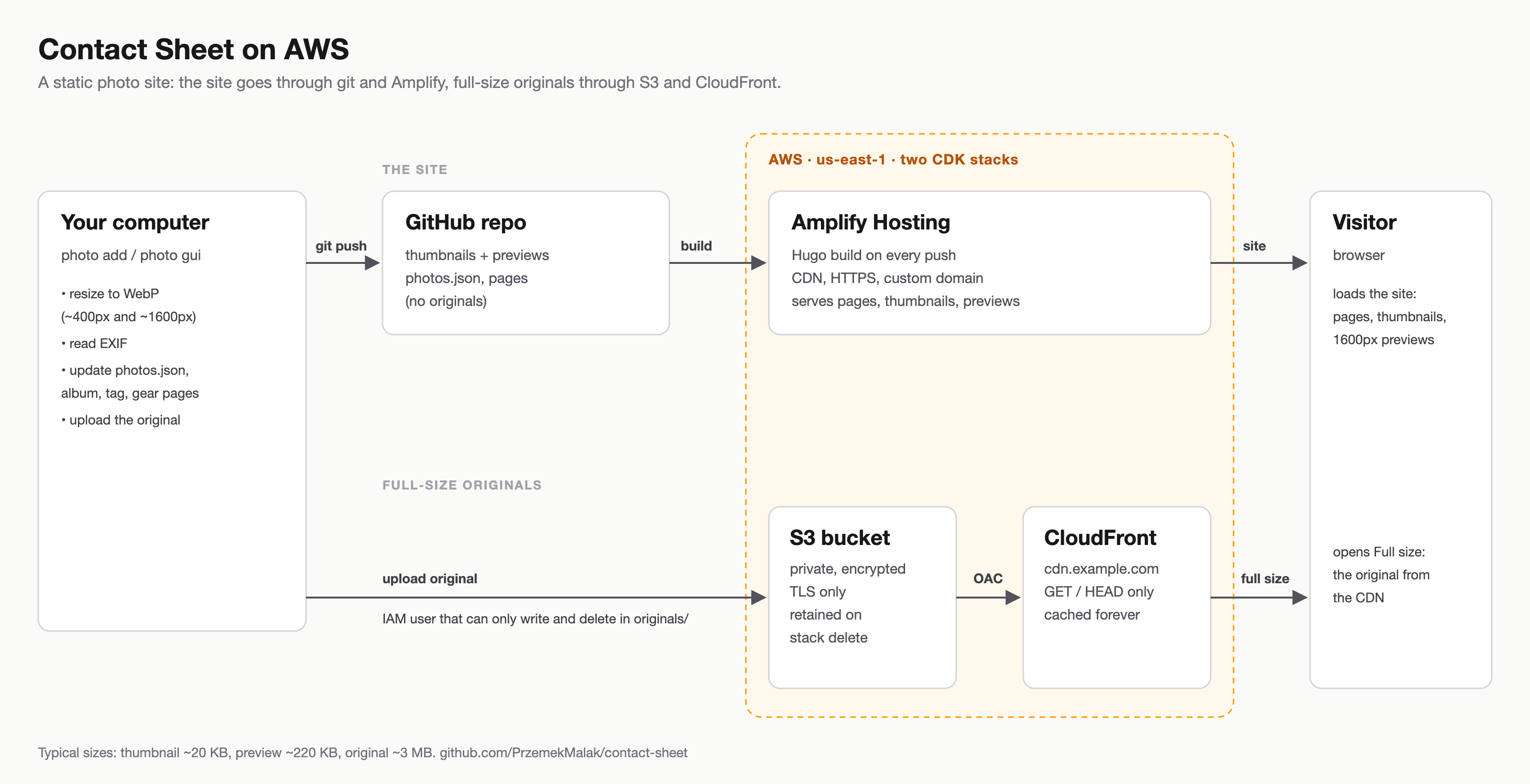
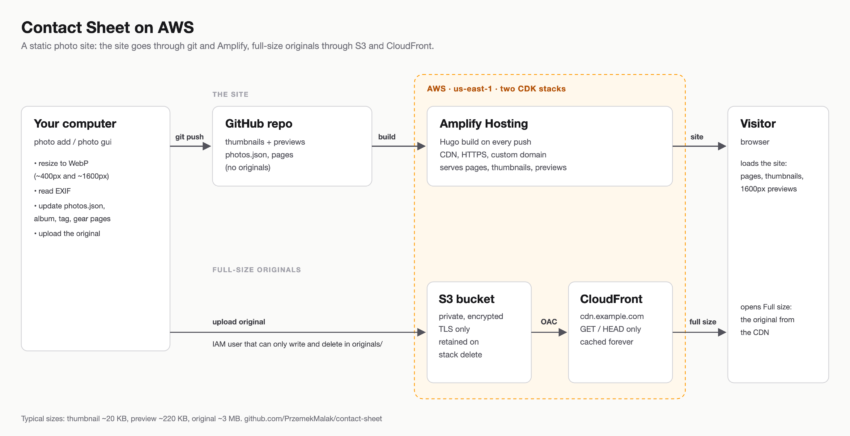
photo addgenerates the WebP thumbnail and preview, reads EXIF and uploads the original to S3. Then it updates the catalog plus the album, tag and gear pages.- You commit and push (or click Publish in the GUI).
- Amplify builds the Hugo site and serves it.
- The browser loads thumbnails and previews from the site, and the “Full size” link goes to the original on CloudFront.
The AWS part is optional. In local mode nothing is uploaded and the lightbox shows the 1600px preview. You can then host the result on any static host. But this is a cloud blog, so let’s look at the AWS side.
The AWS Side: Two CDK Stacks
The infrastructure is an AWS CDK app in Python with two stacks. Both are deployed to us-east-1. That’s not a random choice: CloudFront only accepts ACM certificates from us-east-1. Keeping everything in one region also makes the setup simpler.
Stack 1: originals (S3 + CloudFront + IAM)
This stack does one job: it stores full-resolution photos and serves them over HTTPS from my own domain (cdn.malak.photo).
A private, encrypted S3 bucket
The bucket is as locked down as S3 allows:
BlockPublicAccess.BLOCK_ALL: no public ACLs and no public bucket policy, ever.- Server-side encryption (SSE-S3) and
enforce_ssl, so the bucket policy denies any request that doesn’t use TLS. RemovalPolicy.RETAIN: if I runcdk destroy, the stack goes away but my photos stay. For a bucket that holds originals, that’s the only sensible default. (The opposite case, emptying a bucket when its CloudFormation stack is deleted, is in an older post, in Polish.)- No versioning. The originals also live on my disk. On top of that,
photo backupdownloads the original of every photo in the catalog to a local folder. So I don’t pay for old versions.
CloudFront with Origin Access Control
CloudFront sits in front of the bucket with Origin Access Control (OAC), the successor to Origin Access Identity. CDK writes the bucket policy that lets only this distribution read objects, signed with SigV4. The behavior is minimal: GET and HEAD only, HTTP redirected to HTTPS, and the managed CachingOptimized policy. That suits originals, which rarely change once uploaded.
self.distribution = cloudfront.Distribution(
    self, "Distribution",
    default_behavior=cloudfront.BehaviorOptions(
        origin=origins.S3BucketOrigin.with_origin_access_control(self.bucket),
        viewer_protocol_policy=cloudfront.ViewerProtocolPolicy.REDIRECT_TO_HTTPS,
        allowed_methods=cloudfront.AllowedMethods.ALLOW_GET_HEAD,
        cache_policy=cloudfront.CachePolicy.CACHING_OPTIMIZED,
    ),
    domain_names=domain_names,
    certificate=certificate,
    price_class=price_class,  # PriceClass_100 unless you set it
)
A custom CDN domain
A custom domain is optional. With a Route 53 hosted zone, the stack creates the ACM certificate and validates it via DNS. It also adds the alias record on its own. With DNS somewhere else, the deploy pauses on the certificate until you add the validation CNAME by hand. Without a domain, you just use the *.cloudfront.net address.
A least-privilege upload user
The upload user is the part I thought about most. The photo tool runs on my laptop, so it needs credentials. Those credentials should be able to do as little as possible:
self.uploader.add_to_policy(iam.PolicyStatement(
    actions=["s3:ListBucket"],
    resources=[self.bucket.bucket_arn],
))
self.uploader.add_to_policy(iam.PolicyStatement(
    actions=["s3:PutObject", "s3:DeleteObject"],
    resources=[self.bucket.arn_for_objects("originals/*")],
))
The user can list the bucket and write or delete objects under the originals/ prefix. It can’t read anything back, because reads go through the CDN like for everyone else. Nor can it change the bucket or touch any other resource. If the key leaks, the worst case is someone uploading or deleting files in one prefix. Even then, my originals are still on my disk.
DeleteObject is the one permission that can lose data, so the tool is careful with it. The GUI doesn’t delete an original right away. Instead, it queues the delete. The original goes a week after the change is published. It never goes while a photo in the catalog still uses it. More on that in part 2.
Yes, it’s an IAM user with a long-lived access key, which isn’t the textbook answer. I chose it because the tool should work for people who don’t run IAM Identity Center at home. If you do, point the profile in contact-sheet.toml at an SSO profile with the same permissions. The tool uses the standard AWS SDK credential chain, so nothing else changes.
Stack 2: hosting (Amplify)
The second stack is an AWS Amplify app connected to the GitHub repository with the site. Creating it from code (CloudFormation, the CLI or an SDK) takes a GitHub personal access token. I keep the token in Secrets Manager. CDK passes it to CloudFormation as a dynamic reference, so it never appears in the template in plain text. The main branch has auto-build enabled, and an optional custom domain maps both the apex and www to it.
The build itself is defined by amplify.yml in the site’s repository. It downloads a pinned Hugo extended release, plus Go if the theme comes as a Hugo Module. Then it runs hugo --minify --gc and publishes public/. Pinning the version matters. A Hugo upgrade should be a commit I make on purpose, not something that changes under me during a build.
Why Amplify and not a second S3 bucket?
Why Amplify and not a second bucket with CloudFront? I could build the site in GitHub Actions and sync it to S3, and for some setups that’s the better answer. Amplify gives me the build, the CDN, HTTPS certificates, the custom domain and atomic deploys in one managed service. There’s no pipeline to maintain. For a personal site, that trade is worth it.
So the site actually uses two CDNs. Amplify’s, which is CloudFront under the hood, serves the HTML, CSS, JS, thumbnails and previews. My own CloudFront distribution serves the originals. They have different lifecycles. The site is rebuilt on every push, while an original is uploaded once and then served from CloudFront’s cache.
How much does it cost to host a photo portfolio on AWS?
Running this photo portfolio on AWS costs about $1.80 a month at list prices. A new AWS account gets up to $200 in Free Tier credits, which cover that for as long as the credits last.
The numbers behind it
My own site, malak.photo, has about 100 photos. The originals are JPG exports averaging 3.6 MB, about 0.4 GB in S3, and the built site is about 50 MB. I assumed 1,000 visits a month at about 3 MB each. An album page loads around 80 thumbnails of 20 KB, plus a few 1600px previews of 220 KB. I also assumed 30 pushes a month at about 1.5 build minutes each.
| Item | Per month |
|---|---|
| S3 Standard: 0.4 GB of originals at $0.023/GB | < $0.01 |
| CloudFront for the originals (always free up to 1 TB and 10M requests) | $0 |
| Amplify: 3 GB served at $0.15/GB | $0.45 |
| Amplify: 45 build minutes at $0.01/min | $0.45 |
| Amplify: 50 MB stored | < $0.01 |
| Secrets Manager: the GitHub token, $0.40 per secret | $0.40 |
| Route 53: one hosted zone | $0.50 |
| Total | about $1.80 |
Free tier, credits and what grows with traffic
Accounts created before July 15, 2025 had a 12-month free tier for Amplify instead: 1,000 build minutes, 15 GB served and 5 GB stored a month. That covered all of the Amplify lines at this scale. Since then, new accounts get credits instead: $100 at sign-up and up to $100 more for trying out AWS services. Either way it ends, which is why the headline number is $1.80. I left out items under $0.05 a month: S3 requests, Route 53 DNS queries and the CDK bootstrap bucket. The domain itself is extra.
Storage is the cheap part: even 1,000 photos of this size would be about 3.6 GB, or $0.08 a month. What grows with popularity is Amplify data transfer at $0.15 per GB. For example, ten times the traffic adds about $4 a month. Most visitors never download an original. If they do, it comes from CloudFront’s free terabyte, which is per account and shared by all your distributions.
What if someone hotlinks or hammers the originals?
The originals are public by design: anyone with a link can download them. Nothing stops someone from hotlinking a 15 MB photo on a busy page or downloading the whole CDN in a loop. CloudFront’s free terabyte a month absorbs a lot of that. It covers around 280,000 downloads of an average 3.6 MB original, or about 65,000 of a 15 MB one. Beyond it, transfer in North America and Europe costs $0.085 per GB. As a result, 10 TB of downloads in a month would cost about $765.
The site on Amplify is the less protected half. A hotlinked preview is smaller than an original. Still, Amplify charges $0.15 per GB served, so a terabyte there would be about $150. Adding WAF to an Amplify app costs $15 a month plus WAF fees. That’s already more than the whole setup.
How to protect the originals
What you can do about it:
- An AWS Budgets alert. A monthly budget of a few dollars with an email alert costs nothing. It doesn’t cap the bill, and the alert arrives some time after the charges accrue. Even so, it tells you about a spike long before the invoice does. On the Amplify side, that’s realistically the only guard at this price. I wrote more about keeping an eye on AWS costs in an earlier post (in Polish).
- CloudFront’s flat-rate Free plan for the originals. A rate limit per IP at no monthly cost, with caveats (below).
PriceClass_100for the originals. It serves only from edge locations in North America and Europe, so the per-GB price never goes above their rate. It doesn’t make traffic from there cheaper, so for a typical blog audience it’s the weakest guard here. The stack uses it by default; set theprice_classcontext value toPriceClass_Allif you want every edge location.
On malak.photo I run PriceClass_100 and a Budgets alert at $5 a month. The stack can create the alert too: set budget_email (and optionally budget_limit) in its settings.
Option: CloudFront’s flat-rate Free plan
$0 a month, no overage charges, and a WAF web ACL with up to five rules, including a rate limit per IP. That’s a better deal than a standalone WAF, where a web ACL alone costs more than this whole setup. Since September 2026 you can subscribe from CloudFormation or CDK (AWS::PricingPlanManager::Subscription), not only in the console. Contact Sheet’s stack doesn’t subscribe for you: it’s a step in the console, or a resource you add to the stack yourself. Before you subscribe, check the fine print:
- Your distribution needs a WAF web ACL attached before it can subscribe.
- The allowance is 1 million requests and 100 GB a month, so you trade the free terabyte for a fixed price. Requests blocked by WAF don’t count toward it, so the rate limit protects the allowance too.
- The allowance isn’t a hard limit. A first spike up to three times the allowance is fine. However, sustained overuse can get your traffic served from fewer or more distant edge locations. You get slower downloads, not a block or a bill.
- Accounts still on the AWS Free Tier, including the free plan for new accounts, can’t use it.
- A distribution with a plan can’t be deleted until the plan is cancelled. Free plans cancel immediately, but I haven’t tested how a
cdk destroyhandles it, so check before you tear a stack down. - The documentation doesn’t say how the plan interacts with the distribution’s price class, and I haven’t tested it either.
Deploying Your Own Photo Portfolio on AWS with CDK
To deploy your own photo portfolio on AWS, you need the photo tool, v0.3.4 or newer, from the latest release. You also need AWS credentials that can deploy, Python 3 and Node.js (for npx). The full runbook is in infra/README.md.
1. Create the site
The stack settings live in the site, so it comes first:
photo init my-photos --amplify   # --amplify adds the build file for Amplify Hosting
cd my-photos && git init
2. Get the infrastructure code
Clone the repository once, next to your site, and set up the Python environment for CDK:
cd ..
git clone https://github.com/PrzemekMalak/contact-sheet.git
cd contact-sheet/infra
python3 -m venv .venv && .venv/bin/pip install -r requirements.txt
cd ../../my-photos
3. Deploy the originals stack from your site
Back in the site’s root, add a [cdk] section to contact-sheet.toml. The settings stay in your site’s repository and the clone stays untouched, so git pull brings updates without conflicts:
[cdk]
infra   = "../contact-sheet/infra"   # path to the clone
profile = "admin"                    # an AWS profile that can deploy

[cdk.context]
site_name    = "example.com"         # a label: the CloudFront comment and the Amplify app name
budget_email = "you@example.com"     # optional cost alert
photo cdk bootstrap aws://<ACCOUNT_ID>/us-east-1   # once per account
photo cdk diff
photo cdk deploy PhotoSiteStack
photo cdk runs the latest CDK CLI in the clone and passes every [cdk.context] value as -c key=value. If your site’s repository is public, keep the email out of the file and add -c budget_email=... to the command instead. photo cdk -h and docs/cli.md list its options.
Without more settings, the originals are served from a *.cloudfront.net address. For your own CDN domain, add cdn_domain. If that domain’s DNS is in Route 53, also add the hosted zone (hosted_zone_id, hosted_zone_name). The zone has to exist already. The stack adds the certificate validation and the alias record to it.
4. Connect the tool
Create an access key for the upload user and save it as an AWS profile. Then fill the [s3] section of contact-sheet.toml from the stack outputs:
[s3]
bucket   = "<BucketName>"
cdn_base = "https://cdn.example.com"
region   = "us-east-1"
profile  = "photos"
From then on, photo add uploads each original and the site links to it. Decide early, though: photos added in local mode aren’t uploaded retroactively when you switch.
5. Hosting
Push the site to a GitHub repository and store a GitHub token in Secrets Manager. Then add repository, github_token_secret_arn and, optionally, domain_name to [cdk.context] and run photo cdk deploy PhotoSiteHostingStack. It creates the Amplify app that builds the site on every push. The token’s scope and the DNS records for the domain are in the Amplify part of infra/README.md. That’s my setup: I push, and once the build finishes the new photos are live. Any other host that runs Hugo works too.
Summary: a Photo Portfolio on AWS Without Servers
Contact Sheet keeps a photo portfolio on AWS simple. The site is static and runs on Amplify. The originals sit in a private S3 bucket behind CloudFront, and the upload user can do almost nothing. There are no servers to patch and nothing running when nobody is looking, and the whole setup is two CDK stacks.
Part 2 covers the other half. That’s the photo tool, a single Go binary with a local GUI, and the gallery features it drives.
- Source code (MIT): github.com/PrzemekMalak/contact-sheet
- Live example: malak.photo